Sale!

60M USB KVM HDMI Extender, with 1080P R/L Audio by CAT5E Cat6 RJ45 Ethernet Cable Transmitter Receiver Audio Video Converter PC Laptop to TV Monitor(PACK OF1)

About this item

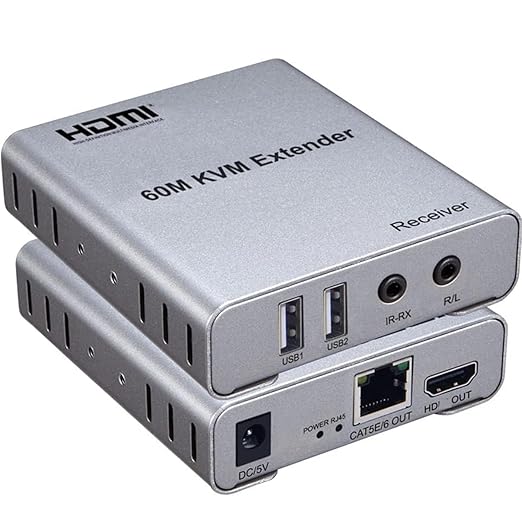
  • Suitable for more HDMI interface devices: Suitable for HDMI interface output devices to connect to monitors, projectors, TV stations, type computers, notebooks, set-top boxes, video recorders, Blu-ray players and other devices.
  • Two-way audio output: Both the transmitter and receiver support 3.5mm left and right channel audio output, which can be freely connected to audio equipment such as speakers, headphones, and headsets.
  • Plug and play multi-system compatibility: support multiple systems such as Windows, MACk, Vista, Linux, etc., no need to install a driver, just plug it in and use it.
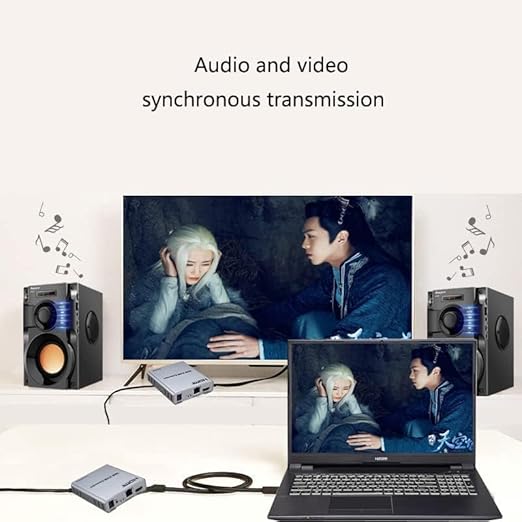
  • Built-in chip smart buffer: using original imported smart chip, long-distance 60 meters lossless transmission, stable and non-flickering. Synchronous audio and video transmission: while zooming in on the screen, it can also support audio transmission.
  • EDID smart switch button: EDID button, this button is used to process EDID, which can switch between EDID supporting 720P and 1080P (the default is to support 1080P EDID at boot).

Original price was: ₹12,999.Current price is: ₹2,799.

Product information

Features & Specs

Operation Mode ON-OFF
Current Rating 2 Amps
Operating Voltage 5 Volts
Contact Type Normally Open
Connector Type Plug In
Circuit Type 2-way
Actuator Type Push Button
Controller Type Push Button
Connectivity Protocol Hdmi
Additional details

Colour GREY
Measurements

Item Dimensions 9 x 8 x 2 Centimeters
Unit Count 1.00 Count
Number of Items 1
Materials & Care

Material Type Metal
Item details

Brand Name Ruhza
Manufacturer VOOCME Mumbai, India, VOOCME Mumbai, India, Help-Line +91-9628788266
Importer Contact Information VOOCME Mumbai, India
Included Components 1 X 60M KVM EXTENDER
Country of Origin China
Manufacturer Contact Information VOOCME Mumbai, India

Product Description

j

HDMI 60m KVM Extender,1080P 60Hz HDMI KVM USB Extender Over Cat5/6 Ethernet Cable Signal Extension Support IR Control, USB Keyboard Mouse Plug & Play

  • Product Information :-
  • An HDMI extender is used to transfer the digital video signal from the source to the high-definition TV. If the cable you use is only a few feet long, it means you have to disconnect and connect the device again you choose for viewing. However, this can be eliminated by using an HDMI extender.
  • HDMI extenders are available in different types, such as active and passive. Active HDMI extenders are more expensive than passive ones but they offer better performance and reliability. You should choose one according to your needs.
  • An active HDMI extender is powered by a power supply and thus needs to be connected to an electrical outlet or power strip. It uses a small amplifier that boosts signals and extends them over long distances of up to 60 feet using CAT5e or CAT6 Ethernet cables. This type of HDMI extender can also extend audio signals as well as video signals over long distances without any loss in quality due to its advanced technology. It allows you to connect multiple devices at once without any problems or issues whatsoever which makes it perfect for use in commercial setups such as meeting rooms or classrooms where multiple people need access at the same time.


t

  • 196FT/60M HDMI KVM Extender :- The USB HDMI KVM Extender lets you control a PC from up to 196ft/60m away over a single qualified Cat 5e or Cat 6 cable connection, with uncompressed 1080p HDMI video.
  • 1080P@60Hz Resolution :- A flexible solution for powering large high-definition displays remotely, this HDMI USB extender supports uncompressed 1080p or 1920×1200 video resolutions at maximum distance.
  • USB Extension :- 2-USB port on the Receiver (RX) allows you to control a computer system using a mouse/keyboard. This HDMI KVM USB extender can be widely used in home security systems, camera monitoring, conference hall broadcasting, restaurant projection and more.
  • Durability & Reliability :- Compact design, and aluminum alloy metal shell is good for heat dissipation, wear resistance, and can extend its service life.
  • Plug & Play :- Easy to carry, install and use, no software and extra setting needed.


f

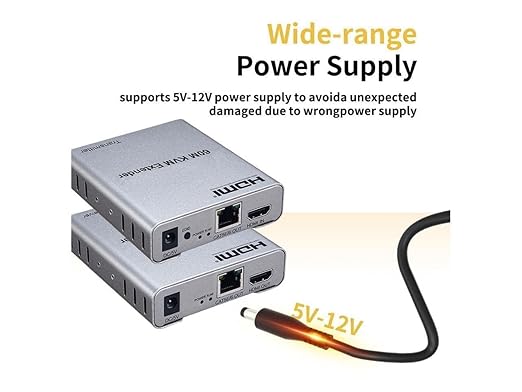
Connect 5V power supply to the TX and RX


  • LED indicator light :- TX LED indicator light: When there is signal input, it turns blue; RX LED indicator light: When there is signal input, it turns blue.
  • EDID button: The button can support the switch of EDID between 720P and 1080P. (1080P is the default EDID when the power is on).


g

Aluminium alloy metal shell


  • Built-in chip smart buffer: using original imported smart chip, long-distance 60 meters lossless transmission, stable and non-flickering.
  • Synchronous audio and video transmission: while zooming in on the screen, it can also support audio transmission.


f

1080P 60Hz Resolution


  • A flexible solution for powering large high-definition displays remotely, this HDMI USB extender supports uncompressed 1080p or 1920×1200 video resolutions at maximum distance.
  • EDID smart switch button:ย EDID button, this button is used to process EDID, which can switch between EDID supporting 720P and 1080P (the default is to support 1080P EDID at boot).


q

Connecting and Operating :-

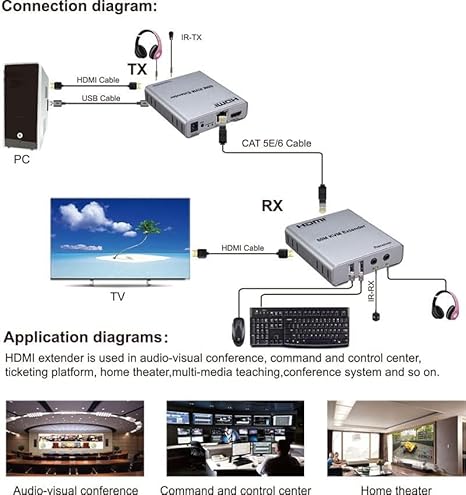
  • 1.Connect one HDMI cable between the source device and TX Extender, the max cable distance is 10 meters;
  • 2.Connect one HDMI cable between the display device and RX Extender, the max cable distance is 15 meters;
  • 3.Connect single cat-5e or cat-6(recommended) cables instead of HDMI cables between TX and RX Extender, the max cable distance is 60 meters;
  • 4.Connect 5V power supply to the TX and RX;
  • 5.LED indicator light: TX LED indicator light: When there is signal input, it turns blue; RX LED indicator light: When there is signal input, it turns blue;
  • 6.EDID button: The button can support the switch of EDID between 720P and 1080P. (1080P is the default EDID when the power is on).
  • 7.Plug the IR receiver cable into the receiver.and IR transmitter cable plug into the transmitter if you need the IR receiver cable,aim at the equipment which needs to control. Plug the mouse and keyboard into the two USB port of the receiver,and connect the USB port of the transmitter with the computer if you need the KVM control function.


e
d
0
    0
    Your Cart
    Your cart is emptyReturn to Shop